> ## Documentation Index
> Fetch the complete documentation index at: https://docs.usespoke.xyz/llms.txt
> Use this file to discover all available pages before exploring further.
# Your first five minutes
> Inspect the live testnet flow without a wallet, then choose a merchant, distributor, or buyer journey.
You can understand Spoke before connecting a wallet. This walkthrough uses public pages from the deployed application.
Open [Spoke Explore](https://usespoke.xyz/explore). Look for the **Live testnet** label. Open a campaign and read its product price, reward rate, maximum paid levels, and settlement hold.
A campaign's reward is paid from its merchant's funded budget. The amount shown is a policy calculation, not a guarantee that a sale will happen.
Open the campaign's network view. Each node represents a sharing link with a fixed parent. A branch can grow without every ancestor being paid: the policy limits the number of eligible levels.
The [recorded demonstration network](https://usespoke.xyz/c/3/network) contains a settled sale and a refunded sale. Select a sale to inspect its path.
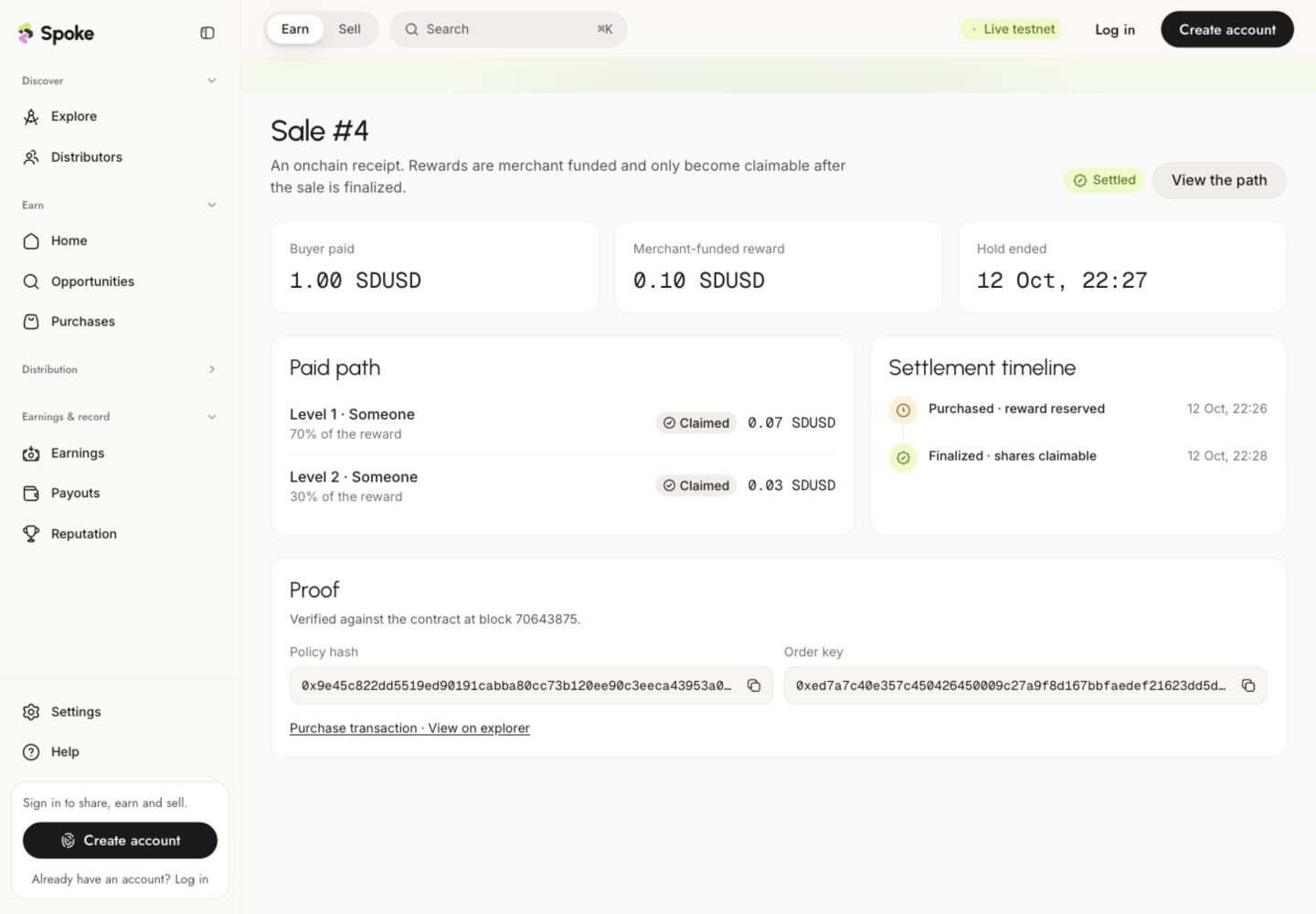
Open [sale 4](https://usespoke.xyz/receipts/10143/4). Compare the buyer payment, merchant-funded reward, paid path, settlement timeline, and transaction proof.
This is a scripted testnet demonstration. The receipt proves contract behavior, not commercial activity.
[Merchants](/guides/merchants) create and fund offers. [Distributors](/guides/distributors) create links and claim eligible rewards. [Buyers](/guides/buyers) purchase and access their delivery.
Use **Create account** or **Log in** when you are ready for an action that requires an account. Review each wallet request before signing.
 ## Want to explore without transactions?
Open [Demo mode](https://usespoke.xyz/demo). It uses sample data to explain the interface and preview additional workflows. Demo balances and activity do not represent onchain funds. Read [live and demo environments](/guides/live-and-demo) before switching between them.
## Before your first testnet transaction
* Use **Monad Testnet**, chain ID **10143**, for the current settlement flow.
* SDUSD is the test token used for prices and rewards; MON pays network gas.
* Testnet gas assistance may be available from the application, subject to its limits.
* A wallet confirmation is only the beginning. Wait for transaction confirmation and indexing before treating the action as complete.
* Mainnet USDC obtained through a future funding activation will not buy testnet products.
This documentation is built and hosted on [Mintlify](https://mintlify.com), a developer documentation platform.
## Want to explore without transactions?
Open [Demo mode](https://usespoke.xyz/demo). It uses sample data to explain the interface and preview additional workflows. Demo balances and activity do not represent onchain funds. Read [live and demo environments](/guides/live-and-demo) before switching between them.
## Before your first testnet transaction
* Use **Monad Testnet**, chain ID **10143**, for the current settlement flow.
* SDUSD is the test token used for prices and rewards; MON pays network gas.
* Testnet gas assistance may be available from the application, subject to its limits.
* A wallet confirmation is only the beginning. Wait for transaction confirmation and indexing before treating the action as complete.
* Mainnet USDC obtained through a future funding activation will not buy testnet products.
This documentation is built and hosted on [Mintlify](https://mintlify.com), a developer documentation platform.